Free Audit Get a free audit summary

How to Improve Your Homepage for More Enquiries (Free Tool for Small Businesses)

By AdScaleo • Updated for 2026 • For service businesses, local brands, agencies & small business websites

A practical guide to reviewing homepage clarity, trust, and calls to action so more visitors feel confident enough to enquire

Many small businesses assume that if people are visiting the website, the homepage must be doing its job. In reality, a homepage can look professional on the surface and still leave visitors unsure about what the business offers, why they should trust it, or what to do next.

If you want to improve your homepage for more enquiries, it helps to look beyond design alone. Messaging, structure, trust signals, and call-to-action placement often make the difference between a homepage that creates interest and one that quietly loses it.

In this guide, we’ll look at the areas that matter most, from headline clarity to trust-building and next-step direction. We’ll also show you how to review your own page using AdScaleo’s free Homepage Improvement Tool, so you can spot where your homepage feels strong and where it may need a sharper message.

1) What visitors usually need to feel before they enquire

When businesses try to improve their homepage for more enquiries, they often focus first on design changes, animations, colours, or layout tweaks. Those things can help, but they are rarely the main reason someone decides to contact a business. In most cases, the bigger issue is whether the page creates enough clarity and confidence in the first place.

A visitor usually makes a very fast judgement when they arrive on a homepage. They are not looking for a perfect design review. They are trying to work out whether the business looks relevant, trustworthy, and worth their attention. If that first impression feels vague or uncertain, even a well-built site can quietly lose enquiries.

Simple way to assess it: a homepage usually needs to answer three silent questions quickly: What does this business actually do?, Why should I trust it?, and What should I do next if I’m interested? If one of those feels weak, the page often creates hesitation before a visitor ever reaches your contact form.

This is also why homepage improvement should not be treated as the same thing as a full technical SEO audit. A homepage can load well and still underperform if the message is broad, the proof is buried, or the call to action feels uncertain. Google’s own guidance around helpful content and people-first pages points in the same direction: the page should make sense to the visitor first, not just to a crawler or ranking checklist. Google’s helpful content guidance is here.

A practical way to review the homepage before changing anything

Homepage area What a weaker version often looks like What a stronger version usually does Why it matters for enquiries
Headline Sounds polished, but still leaves the visitor guessing what the business actually helps with Gives a clearer sense of the offer, the audience, or the result without making people work too hard The visitor understands the page faster and is more likely to keep reading
Trust Reviews, proof, or credibility exist somewhere on the site, but not early enough to support the first impression Important reassurance appears early enough to reduce doubt before the next decision point Visitors feel more confident that the business is legitimate and worth contacting
Calls to action The next step is soft, hidden, or competing with too many other choices One relevant action is easy to notice and feels natural for the page More visitors know what to do instead of drifting away
Overall flow The page contains useful information, but it is scattered, repetitive, or buried too far down The page moves more clearly from offer to reassurance to action The homepage feels easier to trust, easier to follow, and easier to act on

Tip: Swipe sideways to view the full table on mobile.

One useful way to check your own page is to read it as if you knew nothing about the business. Could a new visitor understand the offer quickly? Is there enough visible proof to create confidence? Is the next step obvious without scrolling around the page? Those are often better starting questions than “Does the homepage look modern enough?”

Mini action step: Open your homepage and review only the first visible section. If the offer feels broad, the trust feels delayed, or the next step feels weak, that is often where the enquiry problem begins.

2) Why your first screen often decides whether a visitor stays or leaves

Before anyone reads your full homepage, they usually react to the first visible section. That opening area does more work than many businesses realise. It shapes the first impression, frames the offer, and signals whether the page feels clear enough to keep reading.

A polished design on its own is not enough. If the first screen feels vague, overly stylish, or too busy, visitors may still leave without understanding what makes the business relevant to them. In contrast, a stronger opening usually combines a clear headline, a sensible supporting line, and one main action that feels easy to notice.

A useful test: if someone saw only the top section of your homepage for a few seconds, would they understand what you offer, who it is for, and what they should do next?

Example homepage hero section showing headline CTA and first-screen visual hierarchy for improving homepage enquiries

In the example above, the first screen is doing a few important things well. The message is prominent, the visual hierarchy is easy to follow, and the main calls to action are visible without overwhelming the page. Even before a visitor scrolls, there is already enough structure to guide attention.

That does not mean every homepage needs the same layout or style. It means the opening section should reduce uncertainty, not add to it. If visitors need too much effort to work out what the business offers, or if the first call to action feels weak, the homepage can quietly lose momentum before the rest of the content has a chance to help.

This is also where tools and structured reviews can be helpful. If you want a faster way to assess whether your first screen feels clear, credible, and action-oriented, you can try our Homepage Improvement Tool to review what may be helping your page — and what may still be creating hesitation.

3) What makes a homepage headline clearer and more enquiry-friendly

One of the fastest ways to improve your homepage for more enquiries is to look at the main headline. Many business websites lose clarity here because the opening line sounds polished, but still does not explain enough. Visitors should not have to decode what the page means or guess whether the business is relevant to them.

A clearer headline does not need to be clever. In most cases, it works better when it helps the visitor quickly understand the offer, the audience, or the result. This is especially important on small business websites, where the homepage often has to do the job of introduction, reassurance, and direction all at once.

Simple rule: if your headline sounds attractive but still leaves a first-time visitor asking “What exactly do you help with?”, it probably needs more clarity.

Weak headline patterns vs stronger directions

Headline style Common weak version Stronger direction Why it helps
Stylish but vague A broad phrase that sounds premium but says very little about the offer A headline that makes the offer or benefit clearer within a few seconds Reduces confusion and helps visitors self-identify faster
Too internal Wording that makes sense to the business owner but not to an outside visitor A line shaped around what the visitor is looking for, not how the business describes itself internally Makes the homepage feel more relevant from the start
Too generic The same kind of headline dozens of similar businesses could use A headline with a clearer angle, audience, or outcome Gives the page more specificity and improves first impression quality
Too overloaded One long opening sentence trying to explain everything at once A simpler headline supported by a useful second line beneath it Makes the page easier to scan and easier to trust

Tip: Swipe sideways to view the full table on mobile.

This is also one reason homepage work should be treated as part of the wider website experience, not just as isolated copywriting. If the full site structure is unclear, even a better headline may not carry the whole page on its own. We covered that more broadly in our guide on how to make a website for small business in the UK.

Mini action step: Read your homepage headline on its own, without the rest of the page. If a new visitor would still struggle to understand the offer or the relevance, rewrite the opening line before changing anything else.

4) Why trust signals often matter more than extra design polish

A homepage can look polished, modern, and visually well designed, yet still struggle to turn interest into enquiries. One of the most common reasons is that the page feels presentable without feeling convincing. Design may help create a first impression, but trust is what helps a visitor feel comfortable enough to stay, explore, and take the next step.

In practice, trust usually comes from a combination of signals rather than one dramatic element. That might include clear positioning, visible testimonials, recognisable proof, sensible calls to action, realistic promises, and enough reassurance early on the page. When those signals are weak, delayed, or scattered too far down, the homepage may quietly lose confidence before the visitor reaches your enquiry form.
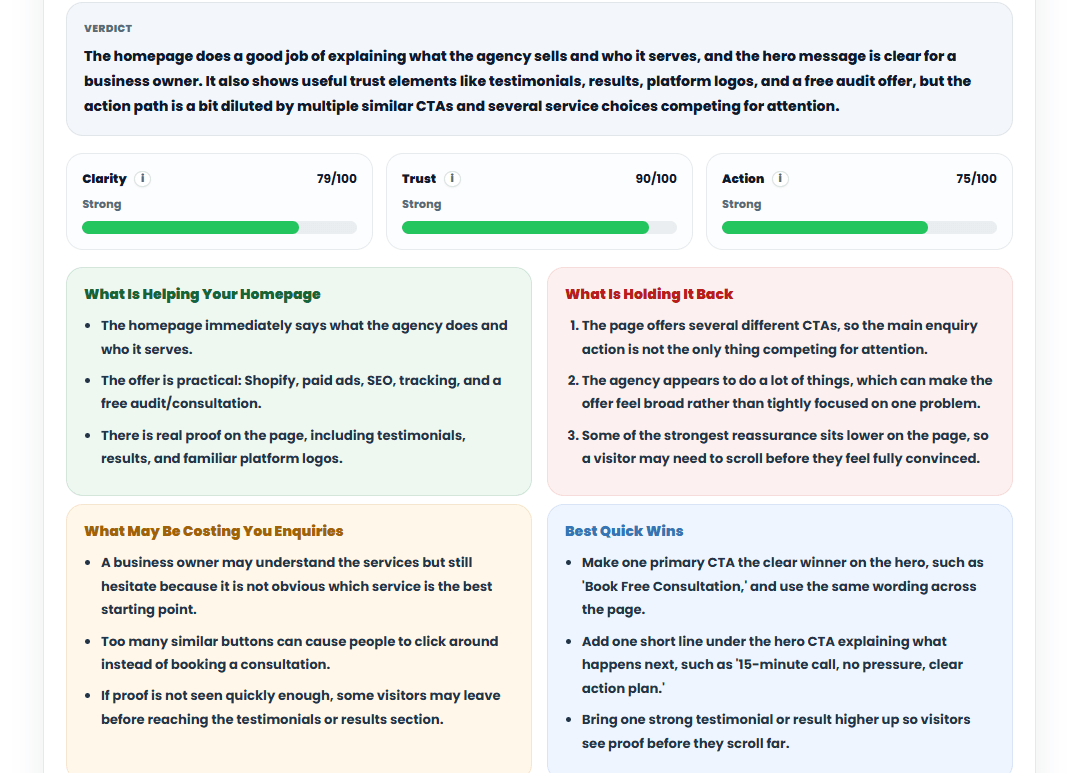
Example screenshot showing how to improve your homepage for more enquiries by reviewing trust signals clarity action and enquiry friction

What this image shows: this example review highlights how a homepage can look strong in some areas while still losing momentum in others. The screenshot shows clarity, trust, and action scoring, along with panels explaining what is helping the page, what may be holding it back, what could be reducing enquiries, and which quick wins are most worth addressing first.

The reason this matters is simple: visitors rarely decide based on one isolated factor. They respond to the overall feeling of the page. If the homepage looks professional but the trust feels thin, the proof appears too late, or the main action is competing with too many other choices, hesitation usually grows. That hesitation is often where enquiries start to disappear.

Practical takeaway: if your homepage feels polished but still is not generating enough enquiries, the issue may be less about appearance and more about whether the page creates enough confidence early enough to support a decision.

This is also where broader reviews can be useful. A homepage is often the first decision point, but trust is influenced by the wider site as well, including service pages, contact paths, loading experience, and how consistent the business feels from page to page. We covered that more broadly in our guide to a free website audit for UK small businesses.

Mini action step: look at the first half of your homepage and ask whether a new visitor can see enough proof to feel confident in your business before they reach the contact stage. If the reassurance appears too late, trust may be weaker than the design suggests.

5) Why weak calls to action quietly reduce enquiries

Many homepages do not lose enquiries because the business looks unprofessional. They lose them because the next step feels weaker than it should. A visitor may understand the offer, feel reasonably positive about the page, and still leave if the action path feels unclear, too soft, or too crowded with competing choices.

This often happens when multiple buttons are trying to do the job of one clear direction. If every section asks the visitor to do something slightly different, or if the wording is too vague to feel meaningful, the page can create hesitation instead of movement. In enquiry-focused websites, the call to action should feel like a natural continuation of the page — not an afterthought.

Simple principle: a homepage CTA usually works better when it is clear enough to understand, specific enough to feel useful, and consistent enough to feel intentional across the page.

Common CTA mistakes and stronger alternatives

Homepage situation Weaker CTA approach Stronger CTA direction Why it helps enquiries
Service business wants more consultations Uses several vague buttons such as “Learn More”, “Explore”, and “Start” Use one clearer action such as “Book a Consultation” or “Request a Quote” The visitor knows exactly what happens next and does not need to guess the meaning of the button
Local business wants more direct enquiries The homepage spreads attention across too many similar contact paths Choose one main CTA and repeat that wording consistently across the page A clearer primary action reduces friction and makes the enquiry route more obvious
Homepage gets attention but low action CTA appears, but the surrounding copy does not explain why clicking is worth it Support the button with a short line that reduces uncertainty or explains the benefit of taking action Visitors feel more confident because the action is framed more clearly
Ecommerce or product-led page CTA wording stays too general and does not match the product journey Use language that matches intent more closely, such as “Shop Now”, “View Products”, or “Browse Best Sellers” The page feels more aligned with what the visitor expects to do next

Tip: Swipe sideways to view the full table on mobile.

A stronger CTA does not always mean a more aggressive one. In many cases, it simply means the wording is more relevant, more consistent, and better supported by the page around it. The goal is not to push harder. It is to make the next step feel easier to understand and easier to trust.

Mini action step: scan your homepage and count how many different actions you are asking a visitor to take. If the page feels split between too many similar choices, simplify the path and make one main CTA the clearest option.

6) Why homepage feedback is more useful when it leads to a clear next draft

Homepage feedback is useful only up to a point. A business owner can understand that the headline feels broad, the trust appears too late, or the CTA is not strong enough — but the next question is usually the one that matters most: what should the page say instead? That is where many homepage reviews stop too early.

In practice, better homepage work often comes from moving quickly from diagnosis into a clearer draft direction. That does not mean copying generic templates. It means turning the review into something more usable: stronger headline options, clearer CTA wording, and a more focused hero message that gives the page a firmer direction.
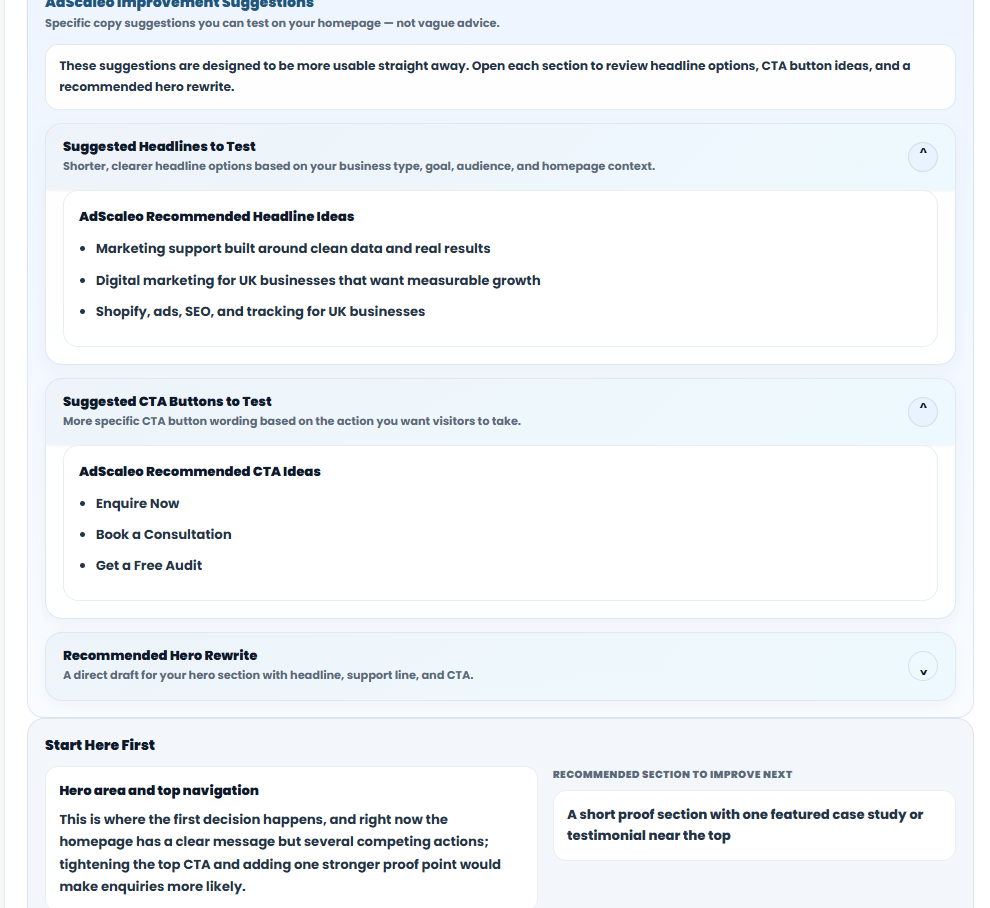
Screenshot showing how to improve your homepage for more enquiries with headline CTA and hero rewrite suggestions

What this image shows: this example moves beyond scoring and highlights practical next-step copy direction. It includes suggested headline ideas to test, CTA button options, and a recommended hero rewrite so the homepage owner can move from “what feels weak” to “what could be improved next”.

That kind of output is often more useful than a long list of abstract recommendations. If someone can see three clearer headlines, a stronger CTA route, or a more focused hero direction, they are much closer to taking action on the homepage rather than simply agreeing that the page needs work.

Practical takeaway: the most useful homepage feedback usually does two jobs at once — it helps explain what is reducing clarity or trust, and it gives a stronger draft direction that is easier to test on the page.

This is especially important for small business websites, where the homepage often has to do a lot of work quickly. A sharper opening message, a more confident CTA, and a clearer hero section can often create more progress than another round of surface-level visual changes.

7) How to review your homepage more objectively before changing it

One reason homepage improvements can feel difficult is that business owners already know their own offer too well. What feels clear to the person who built the page may not feel clear to a first-time visitor. That is why homepage reviews work better when you pause the “inside view” and look at the page more like a new prospect.

This does not require a long technical audit. In most cases, a more useful review starts with a few basic questions: does the page explain the offer quickly enough, does it create trust early enough, and does the next step feel easy enough to take? If the answer feels uncertain in more than one area, that is usually where the enquiry problem begins.

Helpful mindset: do not ask whether your homepage looks “good enough”. Ask whether a new visitor could understand it, trust it, and act on it without needing extra explanation.

Homepage review checklist

  • Can a first-time visitor understand what the business offers within a few seconds?
  • Does the opening section feel relevant to the kind of visitor you want to attract?
  • Are trust signals visible early enough, rather than buried too far down the page?
  • Is there one main call to action that feels clearer than the rest?
  • Does the page flow naturally from offer to proof to next step?
  • Are the headline and supporting copy doing enough to reduce confusion?
  • Would a visitor know why they should choose this business instead of continuing to compare?
  • Does the page feel focused, or is it trying to push too many different actions at once?

This kind of review is useful because it slows down the urge to redesign everything at once. Often, a homepage does not need a full rebuild. It needs a clearer headline, stronger proof near the top, a simpler CTA path, or a better first impression. When you review the page more objectively, those changes become easier to spot.

Mini action step: read your homepage once without clicking anything else on the site. If the offer, trust, or next step still feels uncertain from the homepage alone, start there before making wider website changes.

8) Which kind of tool is actually useful for homepage improvement?

Not every homepage problem needs a full SEO platform. In many cases, the real issue is simpler: the page feels unclear, trust is too weak near the top, or the next step is not obvious enough. That is why it helps to choose the right kind of tool for the job rather than assuming a bigger platform automatically gives a better answer.

Large platforms such as Semrush and Ahrefs are built for deep SEO research, keyword analysis, backlink data, and broader site performance work. They can be very useful, but they are not designed primarily for a business owner who simply wants to understand whether the homepage feels clear, credible, and ready to generate more enquiries. A focused homepage review tool serves a different purpose.

Practical perspective: if your goal is to understand how your homepage comes across to a real visitor, a focused homepage improvement tool can often be more useful than a broad technical platform — especially at the early review stage.

A simple comparison of tool types

Tool type Best for Typical output Where it may feel less useful
AdScaleo Homepage Improvement Tool Reviewing homepage clarity, trust, calls to action, and practical draft direction Homepage-focused feedback, strengths, weak points, quick wins, and copy suggestions Not designed for deep keyword research, backlink analysis, or full technical SEO investigation
Semrush Broad SEO research, keyword tracking, competitor analysis, and technical site reviews Detailed dashboards, audits, keyword data, ranking insights, and larger SEO workflows Can feel heavier than necessary if the main question is simply whether your homepage is clear enough to generate more enquiries
Ahrefs SEO research, backlink analysis, content opportunities, and competitive visibility Search data, link analysis, domain comparisons, and broader SEO insight Less focused on explaining how your homepage feels to a first-time visitor from a messaging and trust point of view
General website builders / analytics tools Building pages, reviewing traffic, and monitoring site behaviour Design controls, analytics data, or page-building workflows Usually do not give a focused explanation of whether the homepage itself is strong enough in clarity, trust, and next-step direction

Tip: Swipe sideways to view the full table on mobile.

That difference matters. If you are an SEO specialist, a larger platform may be exactly what you need. But if you are a business owner, marketer, or team member trying to understand whether the homepage is helping or hurting first impressions, a lighter and more focused review can often be the more practical starting point.

That is also the thinking behind the Homepage Improvement Tool. It is not built to replace a full SEO suite. It is built to help you review how your homepage presents your business, where it may be creating hesitation, and what kind of improvements could make the page easier to trust and act on.

FAQs about how to improve your homepage for more enquiries

What is the fastest way to improve your homepage for more enquiries?

The fastest improvement is usually not a full redesign. It is often a clearer headline, stronger proof near the top of the page, and a more obvious next step. Small changes to clarity, trust, and calls to action can make a homepage feel more convincing without rebuilding the whole site.

Why is my homepage getting visitors but not enough enquiries?

In many cases, the problem is not traffic first. It is that the homepage feels unclear, trust appears too late, or the next step is too weak. A visitor may arrive with interest, but still leave if the page does not explain the offer clearly enough or make the enquiry path feel worth taking.

What should a homepage include to generate more enquiries?

A strong homepage usually needs a clear opening message, visible trust signals, and a call to action that feels easy to notice and understand. It should also move naturally from offer to proof to next step, so visitors do not have to work too hard to decide what to do.

Do I need a full SEO tool to improve my homepage?

Not always. Full SEO tools are useful for keyword research, backlink analysis, and broader technical reviews, but homepage improvement often starts with a simpler question: does the page feel clear, trustworthy, and easy to act on? For that kind of review, a focused homepage tool or structured checklist can be more practical.

How often should I review my homepage?

A homepage should be reviewed whenever the offer changes, the business shifts direction, or enquiries start feeling weaker than expected. Even without major changes, checking the page every few months is useful because small issues in messaging, proof, or CTA clarity can build up over time.

Can improving a homepage really increase enquiries without changing the whole website?

Yes, in many cases it can. If the homepage already gets relevant visitors, improving the opening message, trust signals, and action path can create noticeable gains before a full redesign is needed. The goal is to make the page easier to understand and easier to trust, not necessarily more complex.

Wrapping Up: Improve Your Homepage for More Enquiries by Focusing on Clarity, Trust, and the Next Step

If you want to improve your homepage for more enquiries, the goal is not to make the page look busier or more impressive. The goal is to make it easier for a first-time visitor to understand what you offer, trust your business, and feel comfortable taking the next step.

In many cases, the biggest gains come from relatively simple improvements: a clearer headline, stronger proof near the top of the page, a more focused call to action, and a structure that feels easier to follow. Those are often the changes that reduce hesitation and make the homepage feel more persuasive without turning it into a full redesign project.

If you want a quicker way to review your page, AdScaleo’s Homepage Improvement Tool can help you check what may be helping your homepage — and what may be holding it back.

Try the Homepage Improvement Tool →

Want to keep exploring? You can also read Free Website Audit (UK), How to Make a Small Business Website (UK), and Website Development Services.

×

🚀 Free Website Audit for UK Businesses

We'll analyse your site’s speed, SEO, and tracking — and send custom tips within 48 hours.

💡 Claim My Free Audit ⏳ Only a few audit slots left this week!
AdScaleo Logo
Written by: AdScaleo Team
Shopify • SEO • Paid Ads • Analytics

We help small businesses grow with Shopify optimisation, SEO, paid ads and analytics—using clear strategy, clean implementation and transparent reporting.

Scroll to Top