Google Maps SEO Mistakes for Clinics: 7 Booking Killers (and How to Fix Each One)
By AdScaleo • Updated for 2026 • For local clinics, dentists & healthcare service businesses
A practical checklist-style guide to help your clinic get more calls and bookings from Google Maps
Google Maps SEO mistakes for clinics are one of the biggest reasons a practice can get profile views — but still see low calls, fewer appointment requests, and weak trust compared to nearby competitors.
The tricky part? Most clinics don’t have a “Google problem” — they have a setup problem. Small details like the wrong primary category, missing services, inconsistent contact info, or slow review velocity can quietly push you down in Maps — even if your website looks good.
In this guide, we’ll break down 7 common Google Maps SEO mistakes for clinics and show the exact fixes you can apply. You’ll also get a simple “quick diagnosis” checklist so you can spot what’s blocking bookings — whether you run a dentist practice, physiotherapy clinic, dermatology clinic, or local healthcare service business.
Quick Navigation – Google Maps SEO Mistakes for Clinics
- 1) Mistake #1: Incomplete or Incorrect Google Business Profile Setup
- 2) Mistake #2: Missing or Weak Clinic Services (So Google Can’t Match You)
- 3) Mistake #3: Confusing Website Navigation (Patients Can’t Book Fast)
- 4) Mistake #4: Sending Maps Visitors to the Wrong Page
- 5) Mistake #5: Weak Reviews (or No Review System)
- 6) Mistake #6: You Look Inactive Online (Freshness + Social Proof)
- 7) Mistake #7: No Tracking + No Optimisation Loop
- Bonus Step 8) Trust Pages + Patient-Helpful Content (E-E-A-T)
- FAQs: Google Maps SEO Mistakes for Clinics
1) Wrong Primary Category and Missing Services (Google can’t match you to patient searches)
Google Maps SEO mistakes for clinics often start with one basic issue: your primary category and services don’t reflect what patients actually type into Google. If Google can’t confidently understand what you are, it won’t show you for the searches that drive bookings.
Simple explanation: Your category tells Google “what your business is”. Your services tell Google “what you do”. When those two are accurate, you’re more likely to show up for searches like “emergency dentist”, “physio for back pain”, or “acne treatment clinic”.
This is not about stuffing keywords. It’s about being accurate so Google can match your clinic to the right intent. If you’re not sure where to edit this inside your profile, Google’s official help guide on updating business information is here: Edit your business information (Google).
Real-world “Do vs Don’t” examples clinics can copy
| Clinic scenario | Don’t (common mistake) | Do (clear fix) | Why it improves bookings |
|---|---|---|---|
| Dental clinic wants more urgent bookings | Uses a broad category and leaves services empty | Choose the closest dental-focused primary category and add services like “Emergency dentist”, “Toothache”, “Root canal” | Helps Google match you to high-intent searches that usually lead to calls |
| Physio clinic treats back pain and sports injuries | Picks a “similar” category (wellness/massage) because it sounds close | Use a physio-relevant primary category and add services like “Back pain physiotherapy”, “Sports injury rehab”, “Posture assessment” | Improves relevance so you show up when people search for your exact treatment |
| Skin clinic wants acne and laser leads | Lists only “Skin clinic” and expects the website to rank the profile | Add services like “Acne treatment”, “Skin consultation”, “Laser treatment” (only what you truly offer) | Google understands your services inside Maps, not just on your website |
| General clinic offers multiple appointment types | Adds too many unrelated categories to “rank for everything” | Keep categories tight and use the services list to describe appointment types clearly | Less confusion for Google and patients → better conversion |
Tip: Swipe sideways to view the full table on mobile.
Mini action step: Open your Google Business Profile → check your primary category → then add your top 6–12 services that patients actually search for. This is one of the fastest “clarity wins” you can make when fixing Google Maps SEO mistakes for clinics.
2) Inconsistent Contact Details + Weak Booking Link (you lose patients even if you rank)
One of the fastest ways clinics leak bookings is simple: your Name, Address, and Phone don’t match everywhere, or your booking link sends patients to the wrong page. These Google Maps SEO mistakes for clinics reduce trust for both Google and real patients — and that directly impacts calls, direction requests, and appointment submissions.
Simple explanation: Google wants consistent business information (so it can trust it), and patients want a friction-free path to book (so they act now). If your phone number is outdated, your address formatting is inconsistent, or your appointment link goes to your homepage, you’ll lose patients who were ready to book.
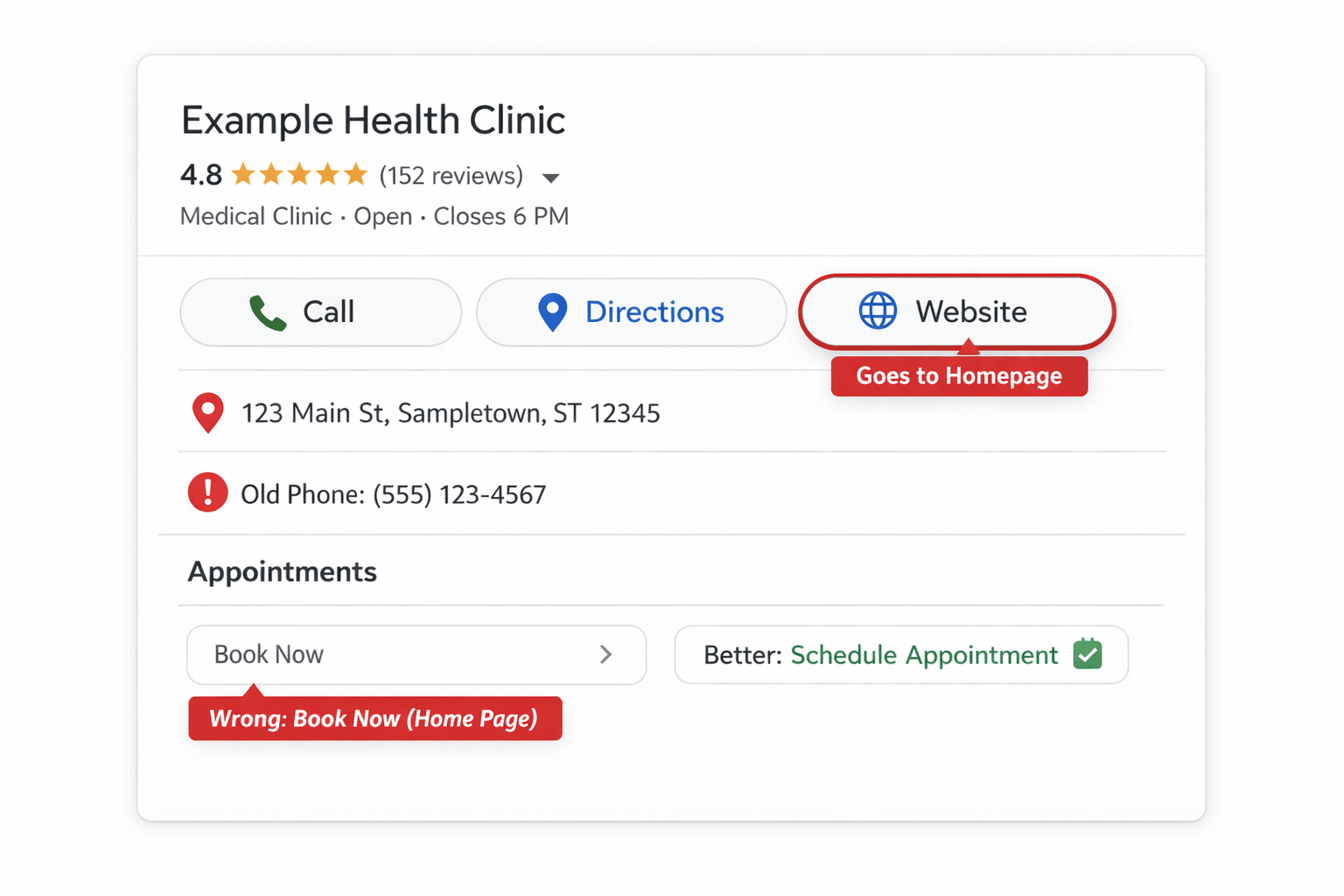
Example: inconsistent phone details and a booking link that goes to the homepage instead of a dedicated appointment page.
What this looks like in real life
- Your Google profile shows an old phone number, but your website header has the new one — patients call, it fails, and they choose the next clinic.
- Your “Appointments” link goes to the homepage instead of an appointment page — patients can’t find the form fast enough and drop off.
- Your address is inconsistent (Suite/Unit formatting, spelling, postcode/ZIP differences) — Google gets mixed signals and patients lose confidence.
Fix it: a clean “booking path” that patients can complete in under 10 seconds
- Standardise your Name/Address/Phone across Google Business Profile and your website (same spelling, same formatting, same number).
- Use one primary phone number that’s answered during business hours (or has a professional voicemail).
- Set your Appointments link to a booking-focused page (not a homepage). The page should show: services, next steps, and a clear form or call button.
- Check your map pin points to the correct entrance (important for clinics inside larger buildings).
- Keep hours accurate and update holiday hours in advance to avoid missed visits and bad reviews.
If you need the official Google steps for updating details, use: Google: Edit your business information.
3) Weak Reviews (or No Review System) — Google and Patients Don’t Trust You Enough to Book
A big reason Google Maps SEO mistakes for clinics hurt bookings is simple: your clinic doesn’t look trusted compared to the clinics around you. In local search, reviews are not just “nice to have” — they influence clicks, calls, and whether someone chooses you over a competitor.
Snippet-ready answer: If your clinic has fewer recent reviews (or doesn’t respond to reviews), patients feel unsure and Google has weaker “prominence” signals — so you get fewer bookings even when you appear in Maps.
What clinics get wrong (real-world examples)
- You ask for reviews “sometimes” — but not consistently — so you get bursts and then long gaps.
- You only ask your happiest patients (or offer a discount) — this can break platform rules and create risk.
- You don’t reply to reviews, so patients assume you’re not attentive (even if your clinic is excellent).
The goal isn’t “gaming” reviews. The goal is a simple, ethical review system that makes it easy for real patients to leave honest feedback. :contentReference[oaicite:0]{index=0} has clear policies on what you should not do (e.g., incentives, review gating, fake reviews). Use these official references: Google Reviews policies and How to request and respond to reviews.
Table: “Do / Don’t” review system for clinics (clear + policy-safe)
| Clinic situation | Do (safe + effective) | Don’t (risky / ineffective) | Why it matters for bookings |
|---|---|---|---|
| After a successful appointment | Send a short SMS/email within 24–48 hours with one clear link to review | Ask weeks later (patients forget), or use a long confusing message | Fresh reviews improve trust and increase call/booking clicks |
| You want more 5-star ratings | Ask every suitable patient for an honest review (no pressure) | Offer discounts/gifts for reviews or ask only “happy” patients | Ethical systems reduce risk and create stable long-term reputation |
| You get a negative review | Reply calmly, acknowledge, and invite offline resolution (no private details) | Ignore it, argue publicly, or share patient information | Good responses rebuild trust and protect conversion rates |
| Your review count is low | Set a weekly target (e.g., 3–5 requests/week) and track it | Do a big push once, then stop for months | Consistency builds steady trust signals over time |
| You want reviews to help the right services | Encourage patients (optionally) to mention the service they used in their own words | Provide scripted keywords or copy-paste review templates | Natural service mentions improve relevance and stay authentic |
Tip: Swipe sideways to view the full table on mobile.
Mini action step (10 minutes): Write one review request message you can reuse. Keep it short, polite, and honest — then send it consistently after completed appointments. This one habit fixes a surprisingly common part of Google Maps SEO mistakes for clinics over time.
4) Weak Reviews (or No Review System) — Patients Don’t Trust You Enough to Book
A very common part of Google Maps SEO mistakes for clinics is relying on “hope” instead of having a consistent review system. In Google Maps, reviews influence two things at the same time: visibility (prominence signals) and conversion (patient trust). If nearby clinics look more trusted, you’ll lose calls even if you appear in the results.
Snippet-ready answer: Clinics get more bookings from Google Maps when they earn recent, genuine reviews and respond professionally. A low review count or long gaps between reviews makes patients hesitate and reduces trust.
Reviews don’t need to be “perfect”. They need to be real, recent, and consistent. The goal is not to manipulate ratings — it’s to make it easy for real patients to leave honest feedback after a completed appointment.
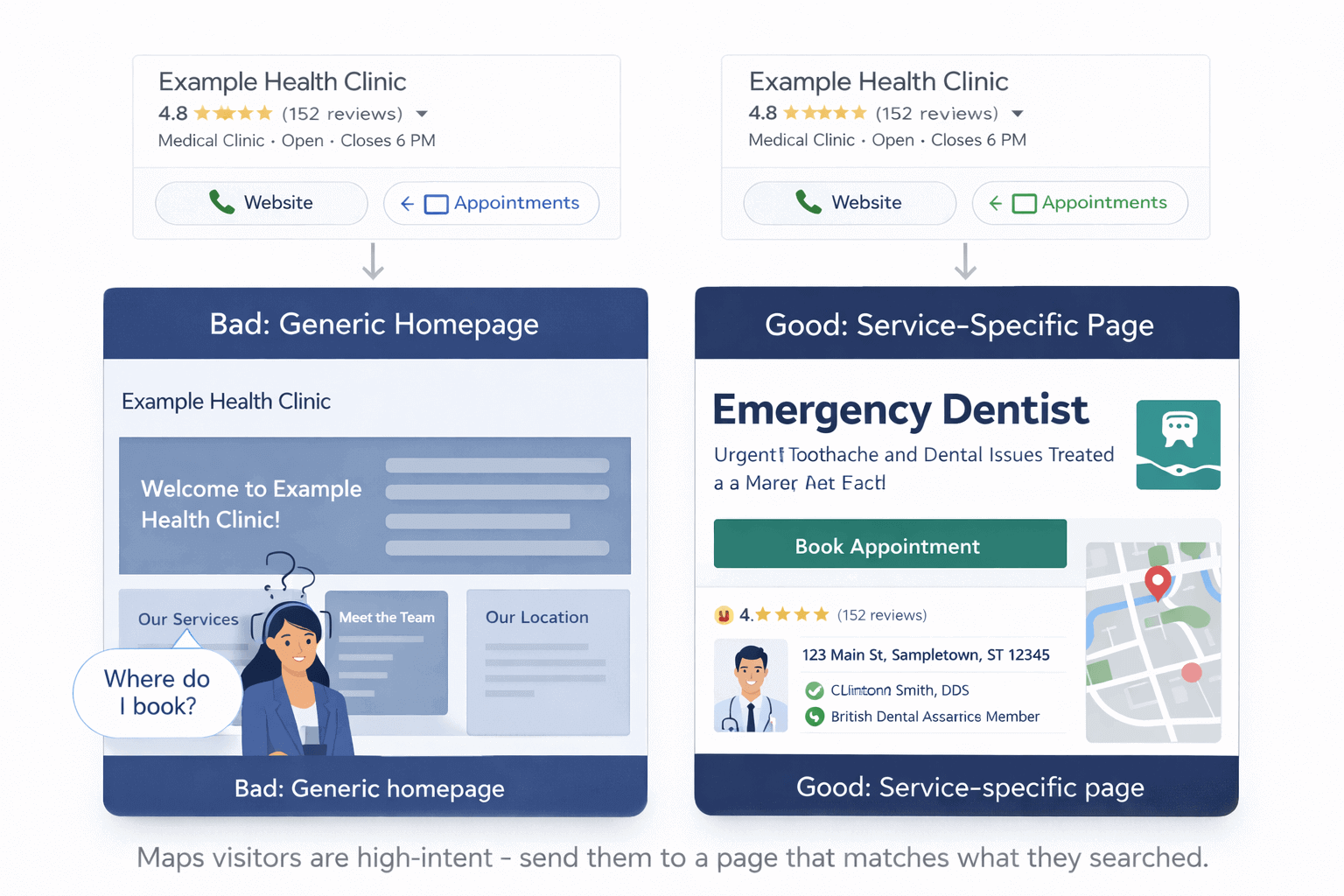
Why this matters for reviews: even if your clinic earns trust through reviews, you still need a clear “Book Appointment” path. The image shows a common issue: a generic homepage creates friction (“Where do I book?”), while a service-specific page makes it easy to act.
What clinics get wrong (real-world)
- They ask for reviews only when they “remember” — resulting in long gaps and a profile that looks inactive.
- They avoid asking because it feels awkward — but competitors who ask politely win trust faster.
- They never respond to reviews, so patients assume the clinic isn’t attentive (even if the service is great).
To stay policy-safe and credible, follow Google’s review guidance (no incentives, no fake reviews, no selective gating). Here are official references: Google Reviews policies and Request and respond to reviews.
Table: A simple review system clinics can run every week (ethical + repeatable)
| Step | What to do | Frequency | Why it helps bookings |
|---|---|---|---|
| 1 | Send a polite review request within 24–48 hours of a completed appointment | Daily or 3–5 times/week | Fresh reviews build trust when patients compare clinics |
| 2 | Reply to new reviews professionally (thank positives, address negatives calmly) | 2× per week | Shows attentiveness and improves patient confidence |
| 3 | Track review count + recent review dates (simple spreadsheet is enough) | Weekly | Prevents “quiet months” where trust signals fade |
| 4 | Encourage patients to mention the service in their own words (optional, not scripted) | Ongoing | Natural service mentions can improve relevance without spam |
| 5 | Keep it ethical: no incentives, no fake reviews, no “review gating” | Always | Protects your reputation and reduces policy risk |
Tip: Swipe sideways to view the full table on mobile.
Mini action step (today): Decide who asks for reviews (front desk, reception, or an automated SMS/email) and set a weekly target. Fixing this removes one of the most damaging Google Maps SEO mistakes for clinics over time.
5) Your Website Navigation Confuses Patients (so you lose bookings even if you rank)
Many clinics focus only on ranking — but ignore what happens after the click. One of the most expensive Google Maps SEO mistakes for clinics is sending patients to a website that feels hard to use on mobile: menus are confusing, the booking button is hidden, and the page doesn’t quickly answer “Can you help me and how do I book?”
Simple rule: A clinic website should help a patient do three things fast: understand the service, trust the clinic, and book an appointment — ideally in under 30 seconds on mobile.
What “bad navigation” looks like (real clinic scenarios)
- The main menu has vague items like “Solutions” or “Treatments” but no clear path to “Book Appointment”.
- The booking link is hidden in the footer, or the phone number isn’t clickable on mobile.
- Patients land on the homepage and can’t immediately tell: what you treat, where you are, and how to book.
- Service pages exist, but they’re not linked clearly — so patients drop off and choose a competitor.
Fix it: a simple clinic website structure that converts
- Put “Book Appointment” and “Call” in the header (visible on every page, especially on mobile).
- Use clear navigation labels patients understand: Services, Pricing (if relevant), About, Reviews, Contact.
- Create one page per high-intent service (e.g., Emergency dentist, Back pain physio, Acne treatment). Each page should answer: who it’s for, what happens, cost/next step, and how to book.
- Add trust signals near booking actions (reviews, clinician credentials, professional memberships).
- Make it fast and friction-free: short sections, readable spacing, no clutter, and a clear booking path.
Helpful AdScaleo resources:
• If you want help fixing SEO + Maps visibility for a clinic, see our
SEO Services.
• If your website needs a clean booking-focused structure, see our
Website Development.
• For deeper learning, these guides help you build a stronger foundation:
How to Make a Website for a Small Business (UK),
UK Local Marketing Strategies (2025),
and
Google AI Overviews SEO (2026).
Mini action step: Open your clinic website on your phone and ask: “Can I book in 10 seconds?” If the answer is no, this is likely contributing to your Google Maps SEO mistakes for clinics — because traffic without bookings is wasted opportunity.
6) You Look Inactive Online (so patients don’t trust you enough to book)
A powerful (and often ignored) part of Google Maps SEO mistakes for clinics is “freshness”. When a patient compares 2–3 clinics on Google Maps, they don’t only look at distance — they look for signs you’re real, current, and professional. If your profile and social presence feel inactive, many people won’t book, even if you rank.
Snippet-ready answer: Patients choose clinics that look active and trustworthy — with recent photos, updated info, and a visible presence on platforms like Instagram/Facebook. This “freshness” improves conversions and reduces drop-offs from Maps.
What patients check in 15 seconds (before they call)
- Photos: do they look clean, professional, and recent?
- Updates: are hours, services, and appointment links correct?
- Reviews: are there recent reviews and do you reply professionally?
- Social proof: can they see you active on Instagram/Facebook (real clinic, real team, real work)?
Table: “Clinic freshness checklist” (what to update + how often)
| What to update | Examples clinics can use (UK + USA) | How often | Why it boosts bookings |
|---|---|---|---|
| Google Business Profile photos | Reception, entrance, treatment room, team photo (no patient info visible) | 2–4 new photos/month | Makes your clinic feel current and credible vs competitors |
| Appointment link + hours | “Book appointment” goes to a booking page; holiday hours updated | Check weekly (5 minutes) | Prevents lost patients who are ready to book now |
| GBP posts / updates (optional) | New service, new clinician, seasonal info, clinic announcement | 1–2 times/month | Adds “activity signals” patients notice when comparing options |
| Instagram / Facebook activity | 1 simple post/week: team, clinic behind-the-scenes, FAQ, before/after policy-safe content | 1× per week | Social proof reduces anxiety and improves trust before calling |
| Review responses | Thank positive reviews; handle negatives calmly; no patient details | Twice per week | Shows professionalism and increases confidence to book |
Tip: Swipe sideways to view the full table on mobile.
Mini action step (this week): Pick one “freshness day” (e.g., Friday). Update: 2 photos, check booking link + hours, reply to reviews, and schedule one Instagram/Facebook post. This reduces a major source of Google Maps SEO mistakes for clinics and increases patient trust without needing ads.
7) No Tracking + No Optimisation Loop (so you repeat the same Google Maps SEO mistakes every month)
The final (and most expensive) Google Maps SEO mistakes for clinics is “set it and forget it”. Clinics update the profile once, do some photos and reviews — but never measure what’s actually driving calls and bookings. Without a simple tracking loop, improvements become guesswork.
Snippet-ready answer: If you don’t track calls, direction requests, website clicks, and bookings coming from Google Business Profile, you can’t reliably improve. Tracking turns “hope” into a repeatable optimisation system.
The “clinic optimisation loop” (simple and realistic)
- Track what patients do (calls, website clicks, directions, bookings).
- Diagnose the biggest leak (low clicks, low calls, or low booking conversion).
- Fix one thing (profile trust, services, booking page, navigation, speed).
- Repeat monthly — small improvements compound.
Table: What to track in a clinic (and what to do when it’s low)
| Metric to watch | What “low” usually means | Best fix (choose one) |
|---|---|---|
| Calls from Google Business Profile | Weak trust (reviews/photos), unclear services, wrong category | Improve reviews + refresh photos + tighten services list |
| Website clicks from GBP | Profile isn’t convincing enough to earn the click | Better photos, stronger description, more complete services |
| Directions requests | Pin/address confusion, missing entrance/parking info | Fix pin + add entrance/parking notes + upload “how to find us” photos |
| Bookings (from website) | Landing page mismatch, confusing navigation, slow booking UX | Send GBP link to a service-specific booking page with one clear CTA |
| Top searches (GBP queries) | You’re showing for the wrong intent, or missing high-intent services | Adjust services list and upgrade the matching service page on your website |
Tip: Swipe sideways to view the full table on mobile.
For the official Google view of what these metrics mean, see: Google Business Profile performance insights.
AdScaleo tracking resources: If you want to track what happens after the click (calls, forms, bookings), these guides help: GA4 Reports for UK Businesses (2025) and GA4 Conversion Tracking Setup (2025). Even if you’re a clinic (not Shopify), the tracking setup mindset is the same: track actions that equal revenue.
Mini action step (30 minutes): Pick one metric from your GBP insights (calls, website clicks, directions). If it’s low, choose one fix from the table and implement it this week. That’s how you stop repeating Google Maps SEO mistakes for clinics — and start improving results month by month.
Bonus Step 8) Build “Trust Pages” + Patient-Helpful Content (E-E-A-T signals that improve conversions)
Here’s a bonus tip most clinics miss: Google Maps visibility helps — but trust is what turns visits into bookings. One of the best E-E-A-T improvements you can make is creating a small set of pages that make patients feel safe, informed, and confident. This reduces hesitation, increases form completions, and supports long-term search performance.
Snippet-ready answer: Clinics convert more Maps traffic when their website clearly shows who they are, what patients can expect, and how patient data is handled. Trust pages + helpful resources are simple E-E-A-T signals that reduce “booking anxiety”.
The “trust pages” every clinic should have (minimum set)
- Privacy Policy: explains what you collect (forms, calls, cookies) and how you protect patient data.
- Terms / Website Terms: sets expectations and reduces misunderstandings (especially for bookings and cancellations).
- Cookie Policy (if you use analytics/ads): helps with consent clarity and transparency.
- Contact + Location page: clear address, service area, parking/entrance notes, and a simple booking path.
Add “patient-helpful” reading material (blog + PDF resources)
You don’t need dozens of blog posts. You need a few high-trust, practical resources that answer real patient questions. These pages can also be repurposed into a simple downloadable PDF (which patients appreciate and can share).
Examples clinics can publish (UK + USA friendly):
- “What to expect” guide: first appointment, timeline, what to bring, common concerns.
- Aftercare instructions: clear do/don’t guidance (written in simple language).
- Pricing / insurance notes: ranges and how billing works (if appropriate for your clinic).
- Condition FAQs: “Is this normal?”, “How long does recovery take?”, “When should I call?”
- Clinic policies: cancellations, late arrivals, emergencies, response times.
E-E-A-T checklist (to make your content feel credible)
- Use real names/titles: “Reviewed by Dr. ___ / Clinic team” (when possible).
- Keep claims realistic: avoid “guaranteed results” or hype.
- Update dates: show “Last updated” for important pages.
- Make it easy to verify: clear location, contact details, credentials, and policies.
- Write for patients first: plain language, short sections, and clear next steps.
Need help writing this content? If you want AdScaleo to create clinic-ready pages (service pages, FAQs, trust pages, blog posts, and downloadable guides), see: Content Writing Services.
FAQs about Google Maps SEO mistakes for clinics (quick, practical answers)
What’s the biggest Google Maps SEO mistake clinics make?
Treating Google Business Profile like a one-time setup. Clinics that don’t update services, photos, reviews, and booking links regularly often lose clicks to competitors — even if they rank.
How fast can a clinic improve Google Maps results?
You can usually improve conversions in 7–14 days by fixing the booking path (send Maps visitors to the right page), adding fresh photos, and starting a consistent review request routine. Ranking improvements often take longer, but trust + conversions can improve quickly.
Do clinics need a website to rank on Google Maps?
Not always — but a strong website helps you convert more bookings and supports long-term trust. Even if you appear in Maps, patients often click to verify services, pricing, and credibility before calling.
How many reviews does a clinic need to compete?
There’s no magic number. The practical goal is to look competitive in your local area and show steady “recent” reviews. A clinic with fewer reviews can still win if reviews are more recent, more detailed, and the clinic responds professionally.
Should clinics post on Instagram or Facebook to help Google Maps SEO?
Social posting doesn’t directly “rank” your Google profile, but it can boost trust and conversions. Many patients check your Instagram/Facebook before booking — so a simple weekly post and an active profile can reduce hesitation and increase calls.
What should a clinic write on its website to improve trust (E-E-A-T)?
Publish a few patient-helpful pages: “What to expect”, FAQs for common concerns, clear service pages, and trust pages like Privacy Policy and Terms. You can also create downloadable PDFs (aftercare guides or first-visit guides) to make patients feel informed and safe.
Wrapping Up: Fix Google Maps SEO Mistakes for Clinics — and Turn Visibility into Bookings
Google Maps SEO mistakes for clinics are rarely “technical SEO problems” — they’re usually trust and conversion problems. If your Google Business Profile looks incomplete, your booking path is unclear, your website is confusing, or your online presence feels inactive, patients will choose the next clinic — even if you appear in the top results.
The winning approach is simple: keep your profile accurate and active, make your website easy to navigate on mobile, build trust with clear information, and track what actually drives calls and bookings. Small improvements compound — and that’s how local clinics beat larger competitors consistently.
Want a practical, expert-led plan to improve your clinic’s Maps visibility and booking conversions? AdScaleo can help.
Get Help With Clinic SEO →Want to explore more? Check out: Google AI Overviews SEO (2026), UK Local Marketing Strategies (2025), How to Make a Small Business Website (UK), and Website Development Services.
🚀 Free Website Audit for UK Businesses
We'll analyse your site’s speed, SEO, and tracking — and send custom tips within 48 hours.
💡 Claim My Free Audit ⏳ Only a few audit slots left this week!
We help small businesses grow with Shopify optimisation, SEO, paid ads and analytics—using clear strategy, clean implementation and transparent reporting.